Art Gallery and Showcase Website
traceymacintyre.com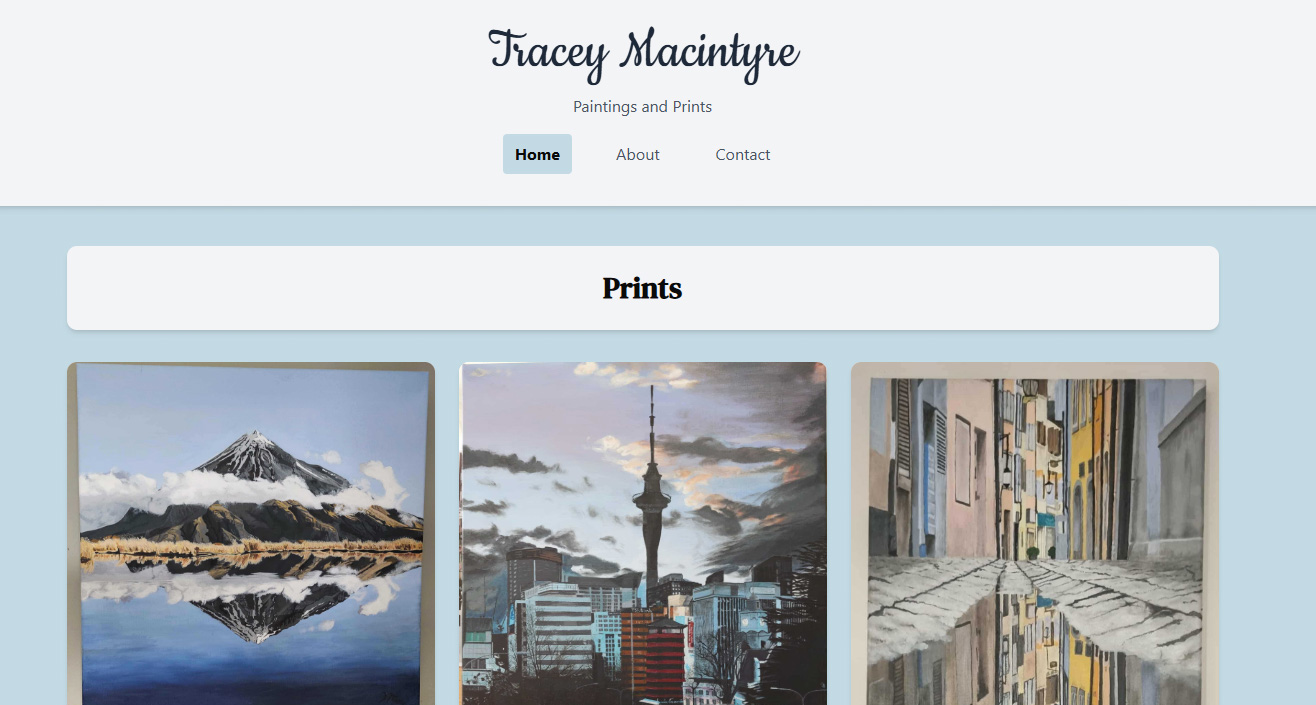
Why an Art Gallery?
After getting my personal portfolio to a point I was happy with, I wanted to take on something with real world stakes, a project to build from scratch for an actual client, not just a side project that gathers dust.
A local artist had been wanting to showcase their artwork online for a while but never had the means to do so. That gave me the perfect opportunity. It would provide me with the opportunity to grow my skills further from the personal portfolio while delivering something genuinely useful, shaped by real feedback from an actual client.
What I Set Out to Do
The brief was straightforward: Create a website to show off the art with a way for people to contact the client. How to get there was up to me and then start to refine the website off client feedback.
The Stack
I chose tools I was familiar with from my portfolio to build on that skil set, plus a few new ones to tackle areas I havent yet like CMS and emailing.
Front End
- Next.js 16 - React framework with App Router, server components, and ISR
- React 19 - Component-based UI
- TypeScript - Type safety across the codebase
- Tailwind CSS 4 - Utility-first styling with OKLCH colour theming
- Motion (Framer Motion v12) - Staggered animations and morphing modals
- Radix UI - Accessible headless primitives (accordion, labels)
Content Management
- Sanity CMS - Headless CMS for artworks, FAQs, and about content
- Sanity Studio - Embedded admin interface at
/admin - Sanity Image URL Builder - Optimised image delivery from the Sanity CDN
Backend & Infrastructure
- Resend - Email delivery for contact form submissions
- Cloudflare Turnstile - CAPTCHA protection
- Vercel - Hosting, deployment, and speed insights
Key Features
Masonry Gallery
The home page uses a responsive CSS columns layout one column on mobile, two on tablets, three on desktop. Each card animates in on scroll with a staggered fade, scale, and slide effect, giving the gallery a polished feel without getting in the way of the artwork.
Morphing Art Card Modals
Clicking an artwork opens a morphing dialog that smoothly transitions from the thumbnail into a full-size view using Framer Motion layout animations. The modal shows the artwork description and, for pieces available as prints, an "Enquire Now" button that links directly to the contact form with the subject prefilled.
Sanity CMS Integration
All content lives in Sanity including artworks, the about page bio, and FAQ entries can all be updated without a developer. The site uses Incremental Static Regeneration with a 60-second revalidation window, so changes go live quickly without sacrificing performance.
Secure Contact Form
The contact form collects name, email, subject, and message, then sends an email via the Resend API. Security is layered:
- Honeypot field to catch bots
- Cloudflare Turnstile CAPTCHA verification
- Server side validation for all fields
The form gives clear feedback throughout. loading states, error messages, and a success confirmation with automatic reset.
Custom Typography
Three fonts create a visual hierarchy suited to an art showcase:
- Cookie - decorative serif for the site title
- DM Serif Text - elegant serif for artwork titles
- Geist - clean sans-serif for body text and UI
What I Learned
This was my first time working with a headless CMS and building a site driven by real client requirements. A few takeaways:
- Separating content from code - makes the site far more maintainable and gives the client real ownership.
- Form security needs multiple layers - no single measure is enough on its own.
- The UI should serve the content - for an art site, that means keeping the design minimal so the artwork stands out.
What's Next
- Add filtering or categories to the gallery as the collection grows.
- Explore an e-commerce flow for purchasing prints directly.
- Continue refining the design based on visitor and artist feedback.