Personal Portfolio Site
adammacintyre.dev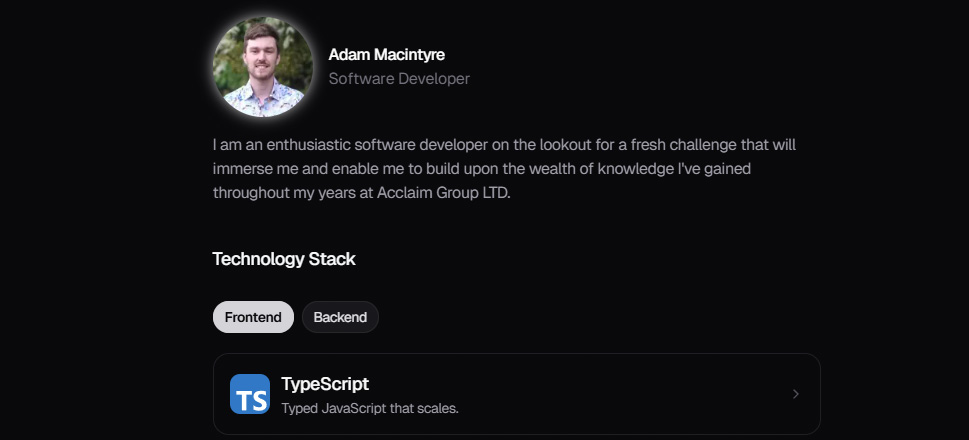
Why I Built This
As a software developer, I wanted a personal space on the web that reflects who I am and what I can do. Rather than relying on a generic template, I set out to build my portfolio from scratch.
The goal was to create something that not only presents my work and experience but also serves as a project in itself — demonstrating my ability to build a polished, modern web application.
What I Set Out to Do
- Responsive single-page portfolio - works well on any device.
- Interactive tech stack - detailed modals for each skill, not just a list.
- Project write-ups - dedicated blog-style pages for each project.
- Light and dark themes - with smooth transitions between modes.
- Subtle animations - micro-interactions that feel polished without being distracting.
The Stack
Front End
- Next.js 16 - React framework with App Router for server-side rendering and static generation.
- React 19 - Component based UI library.
- TypeScript - Type safe JavaScript for a more reliable codebase.
- Tailwind CSS 4 - Utility first CSS framework for rapid, consistent styling.
- Motion - Animation library for smooth transitions, spring physics, and micro-interactions.
- MDX - Markdown with JSX support, used for writing these project blog posts.
- next-themes - Theme management for light, dark, and system preference modes.
- Radix UI - Accessible, headless UI primitives.
- Lucide React - Icon library.
Tooling & Analytics
- Vercel - Hosting and deployment platform.
- Vercel Analytics & Speed Insights - Performance monitoring and web vitals tracking.
- ESLint & Prettier - Code quality and formatting.
Key Features
Interactive Tech Stack
The Technology Stack section uses a tabbed layout to separate frontend and backend skills. Each technology card opens a morphing dialog with more detail and links to relevant projects where that technology is used.
Animations & Motion
A lot of attention went into making the site feel alive without being distracting. This includes:
- Animated text effects on page load
- Magnetic cursor interaction on social links
- Animated background that follows hover state
- Glow effect around the profile image
- Scroll progress bar on blog pages
Theming
The site supports light, dark, and system preference themes using CSS custom properties in the OKLCH colour space. The theme switcher in the footer allows visitors to toggle between modes with smooth transitions.
Blog / Project Pages
Each personal project has a dedicated write up built with MDX, allowing rich content with custom components. The blog layout includes a scroll progress indicator and clean typography via Tailwind's prose classes.
What I Learned
Building this portfolio was a great exercise in bringing together modern frontend tools into a cohesive product. A few takeaways:
- App Router patterns - working with Next.js 16 and React 19 pushed me to stay current with the latest server component and routing patterns.
- Animation restraint - adding motion is easy, knowing when to hold back is harder. The goal was polish, not spectacle.
- Theming with OKLCH - using a perceptually uniform colour space made the light and dark modes feel consistent rather than just inverted.
What's Next
- Continue adding project write ups as I build new things.
- Expand the blog with lessons learned and challenges faced.